
Calculate work hours more easily with a continuous 24-hour format. Record start times, end times, breaks, and overnight shifts using four-digit military-time.
Calculating work hours becomes much easier when every shift uses one continuous 24-hour format. Instead of switching between AM and PM, you can record start times, end times, breaks, and overnight shifts using four-digit military-time.
For employees, managers, supervisors, and anyone checking a work schedule, the main challenge is usually calculating the exact time between two military-time entries.
Calculate Military-Time for a Work Shift
For a standard same-day shift, the basic calculation is:
Suppose an employee works:
Convert the times into hours and minutes:
So the employee worked:
If there is an unpaid break, subtract that break from the total.
Example: Unpaid Break
0800 to 1630 = 8 hours 30 minutes
With a 30-minute unpaid break:
The actual working time becomes 8 hours.
This approach works well for standard daytime schedules because the start and end times occur on the same calendar day.
Military-Time Work Schedule Examples
These common workplace calculations show how different start and end times translate into total shift length.
| Start | End | Total Time |
|---|---|---|
| 0700 | 1500 | 8 hours |
| 0800 | 1630 | 8 hours 30 minutes |
| 0830 | 1700 | 8 hours 30 minutes |
| 0900 | 1730 | 8 hours 30 minutes |
| 1200 | 2000 | 8 hours |
| 1400 | 2200 | 8 hours |
| 1600 | 0000 | 8 hours |
These calculations are particularly useful for timesheets, employee schedules, shift planning, attendance records, and payroll preparation.
For official workplace policies, however, the calculation of payable hours, breaks, overtime, and premium pay can depend on the applicable employment rules and employer policy.
How to Calculate Hours Between Two Military-Times
For a normal same-day shift, subtract the starting time from the ending time.
Example 1: 0800 to 1200
Total: 4 hours
Example 2: 0930 to 1745
Break the calculation into hours and minutes:
Total = 8 hours 15 minutes
Example 3: 1100 to 1930
Total = 8 hours 30 minutes
Want to calculate work times faster? Use the Calculator Online Pro Military-Time Converter →
How to Calculate an Overnight Work Shift
Overnight schedules require one additional step because the employee finishes after midnight.
For example:
You cannot simply calculate 0600 − 2200 because 0600 belongs to the following day.
Instead, split the shift at midnight:
Therefore, the overnight shift lasts:
Another Overnight Example
An employee works:
Calculate the time before midnight:
Then calculate the time after midnight:
Total = 2 hours 30 minutes
This method is especially useful for night shifts, security schedules, healthcare shifts, transportation, hospitality, emergency services, and other jobs operating across midnight.
A workday can span two calendar days, so the date should be considered when recording overnight schedules rather than treating the second time as if it occurred earlier on the same day.
Need a clearer explanation of midnight in military-time? Read the 0000 Military-Time Guide →
How to Calculate a Work Schedule With a Break
When calculating paid working time, first determine the complete shift length and then subtract any applicable unpaid break.
Example: 0800 to 1700
Start:
End:
Total shift:
Unpaid lunch:
Working time:
Therefore: 0800–1700 − 30 minutes = 8 hours 30 minutes
Example: 0700 to 1530
Total elapsed time:
After a 30-minute unpaid break:
The important point is to distinguish elapsed shift time from hours actually counted as working time under the applicable workplace policy.
How to Calculate Multiple Work Shifts
For employees working different shifts during the week, calculate each shift separately before adding the totals.
| Day | Start | End | Shift Length |
|---|---|---|---|
| Monday | 0800 | 1630 | 8h 30m |
| Tuesday | 0800 | 1630 | 8h 30m |
| Wednesday | 0900 | 1730 | 8h 30m |
| Thursday | 0800 | 1600 | 8h |
| Friday | 0800 | 1600 | 8h |
Then add the daily totals.
The same process can be used for rotating schedules, flexible schedules, part-time shifts, and overnight work.
For organizations using formal scheduling systems, remember that work-schedule and overtime rules can differ by employer, jurisdiction, employee classification, and applicable agreement.
Converting Military-Time Before Calculating Work Hours
If your schedule mixes standard AM/PM time with military-time, convert everything into the same format before calculating.
| Standard-Time | Military-Time |
|---|---|
| 7:00 AM | 0700 |
| 8:30 AM | 0830 |
| 12:00 PM | 1200 |
| 1:00 PM | 1300 |
| 3:30 PM | 1530 |
| 5:00 PM | 1700 |
| 6:30 PM | 1830 |
| 9:00 PM | 2100 |
| 11:00 PM | 2300 |
| 12:00 AM | 0000 |
For PM times from 1:00 PM through 11:59 PM, add 12 to the hour.
For morning times, the hour remains the same with a leading zero when necessary:
Calculator Online Pro handles these conversions automatically, helping you avoid mistakes when entering shift schedules or checking timesheets.
Need help reading military-time aloud? Read the Military-Time Pronunciation Guide →
Need a quick reference for writing military-time correctly? Read the Military-Time Writing Guide →
How to Calculate Military-Time for Different Shift Schedules/h2>8-Hour Work Schedule
Example:
0800–1600
1600 − 0800 = 0800
Total = 8 hours
9-Hour Shift With a 1-Hour Break
Example:
0800–1700Elapsed time:
9 hoursBreak:
1 hour
Working time = 8 hours
10-Hour Shift
Example:
0600–1600
1600 − 0600 = 1000
Total = 10 hours
Evening Shift
Example:
1400–2200
2200 − 1400 = 0800
Total = 8 hours
Night Shift
Example:
2200–0600Split at midnight:
2200–0000 = 2 hours
0000–0600 = 6 hours
Total = 8 hours
8-Hour Work Schedule
Example:
Total = 8 hours
9-Hour Shift With a 1-Hour Break
Example:
Elapsed time:
Break:
Working time = 8 hours
10-Hour Shift
Example:
Total = 10 hours
Evening Shift
Example:
Total = 8 hours
Night Shift
Example:
Split at midnight:
Need to understand the end of the 24-hour day? Read What 2359 Means in Military-Time →
How to Calculate Military-Time for Timesheets
A reliable timesheet calculation usually follows this sequence:
Example: 0730
Example: 1630
1630 − 0730 = 0900
9 hours − 30 minutes = 8 hours 30 minutes
This gives you the total hours that can then be reviewed according to the employer’s payroll and overtime rules.
Looking for another military-time writing reference? Check the Military-Time Format Guide →
Military-Time and Decimal Work Hours
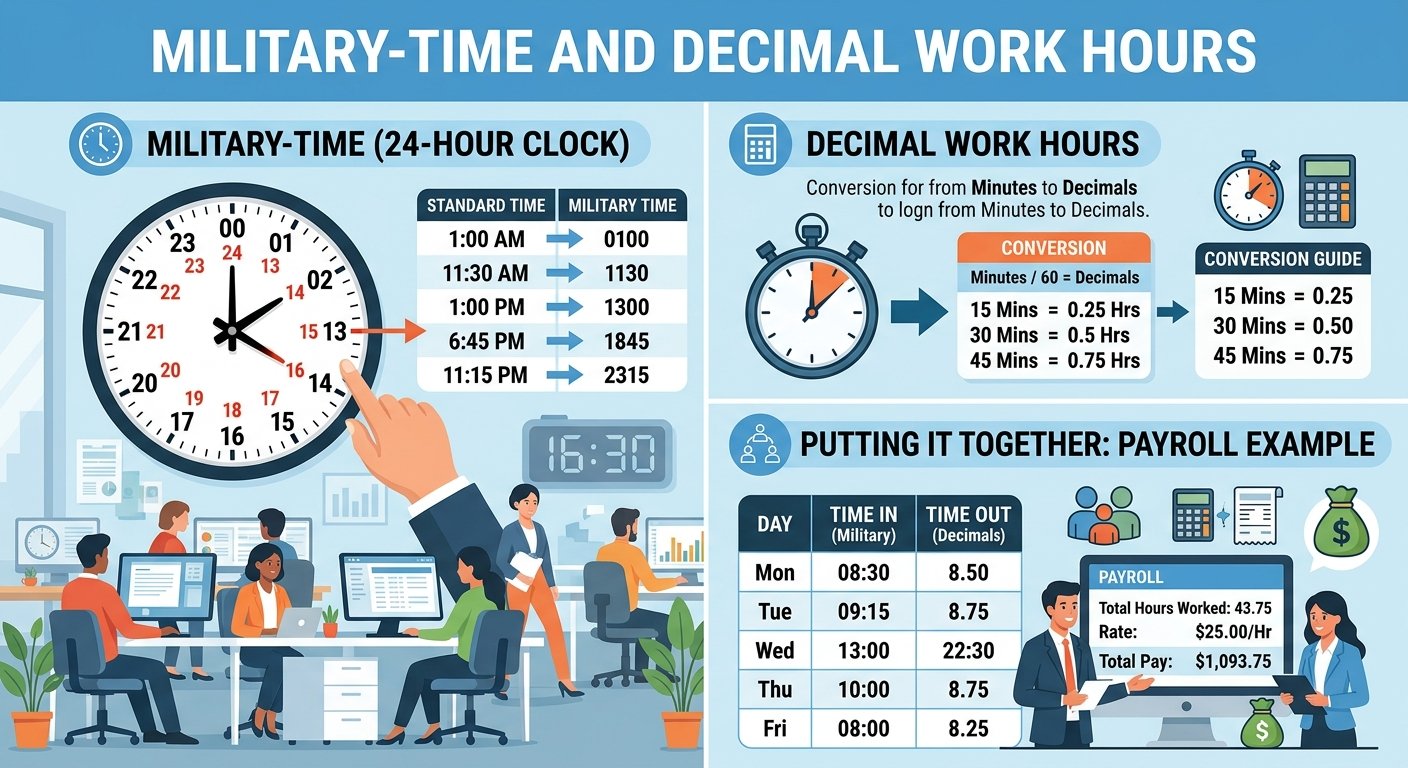
Some payroll and timekeeping systems require hours in decimal form instead of hours and minutes.
8 Hours 30 Minutes
8 hours 30 minutes = 8.5 hours
8 Hours 15 Minutes
8 hours 15 minutes = 8.25 hours
8 Hours 45 Minutes
8 hours 45 minutes = 8.75 hours
Quick Conversion Table
| Hours & Minutes | Decimal Hours |
|---|---|
| 8h 00m | 8.00 |
| 8h 15m | 8.25 |
| 8h 30m | 8.50 |
| 8h 45m | 8.75 |
| 9h 00m | 9.00 |
| 9h 30m | 9.50 |
| 10h 15m | 10.25 |
Important Difference
8:30 does not mean 8.30 decimal hours.
Wondering whether military-time uses punctuation? Read the Military-Time Colon Guide →
How to Calculate Weekly Military-Time Hours
Once each daily shift has been calculated, add the working hours together.
Add them:
The resulting total can then be reviewed against the applicable overtime policy.
For U.S. employees, do not automatically assume that every situation follows one universal overtime calculation. Federal rules, state requirements, employment agreements, exemptions, and workplace policies can affect how hours are treated.
Common Military-Time Shift Schedules Mistakes
1. Forgetting the Leading Zero
Write:
rather than 700. Four-digit formatting makes schedules easier to scan and compare.
2. Treating 1200 as Midnight
Keeping these two times separate prevents one of the most common 24-hour clock errors.
3. Subtracting Across Midnight Incorrectly
For:
Do not calculate:
Instead:
4. Forgetting Unpaid Breaks
A shift from:
is 9 elapsed hours.
If an unpaid 1-hour break applies:
5. Confusing Minutes With Decimals
It is not 8.30 hours.
6. Mixing AM/PM and Military-Time
A schedule becomes easier to calculate when all entries use one consistent format.
Calculate Military Work Hours Faster With Calculator Online Pro
Manual calculations are manageable for one shift, but repeated calculations can become time-consuming when you are checking several employees, multiple shifts, overnight schedules, or a full week’s timesheet.
Calculator Online Pro helps simplify the process by providing fast time-conversion and calculation tools in one place.
Why Use the Calculator Online Pro Tools?
Instead of repeatedly calculating whether 1730 means 5:30 PM, or manually working through a shift such as 2215–0615, you can use the online tools to speed up the process.
Best Workflow for Calculating Military-Time at Work
For the most consistent results, use this simple workflow:
Example Workflow
This workflow is simple enough for an individual employee and structured enough for repeated timesheet calculations.
Frequently Asked Questions
How do you calculate work hours in military-time?
Subtract the start time from the end time when both times occur on the same day. For overnight shifts, calculate the time before midnight and add the time after midnight.
How many hours is 0800 to 1700?
0800 to 1700 is 9 hours of elapsed time. If there is a 1-hour unpaid break, the working time is 8 hours.
How many hours is 0700 to 1530?
0700 to 1530 equals 8 hours 30 minutes.
How many hours is 2200 to 0600?
2200 to 0600 is 8 hours, assuming there are no breaks to deduct.
How do you calculate 2300 to 0700?
Calculate across midnight:
Total = 8 hours
How do you convert 8:30 hours to decimal time?
Thirty minutes is half an hour:
Therefore: 8:30 = 8.5 decimal hours.
What is 1700 in regular time?
1700 = 5:00 PM.
What is 1730 in regular time?
1730 = 5:30 PM.
What is 0000 in a work schedule?
0000 represents midnight, the beginning of a new calendar day in the 24-hour format. Calculator Online Pro’s converter also uses 0000 for midnight.
Can military-time be used for employee schedules?
Yes. A 24-hour format can make shift start and end times easier to distinguish because each hour has a unique number rather than repeating AM and PM.
Calculate Your Work Schedule Without Manual Time Math
Whether you’re checking a single shift, calculating an overnight schedule, reviewing a weekly timesheet, or converting standard AM/PM entries into military-time, the goal is the same: get an accurate result without unnecessary manual calculations.
Calculator Online Pro gives you a faster way to handle military-time conversions and related time calculations online.
Need a quick military-time calculation?
Convert your work schedule and check your 24-hour format quickly.