
Calculate your working hours by subtracting your clock-in time from your clock-out time, then deducting any unpaid breaks. Convert the result into decimal hours if your payroll or invoicing requires it.
Need to calculate how many hours you worked today? Enter your clock-in and clock-out times, account for any unpaid breaks, and calculate your total working time without manually counting every minute.
A work hours calculator helps you work out daily work hours, check timesheet entries, calculate overnight shifts, and convert hours and minutes into decimal hours for payroll or invoicing.
Whether you are an hourly employee checking your work hours, a freelancer tracking billable time, or a business owner reviewing employee attendance, accurate time calculations make your records easier to manage.
Calculate Your Clock-In and Clock-Out Hours
To calculate your working hours, find the time between clocking in and clocking out, then subtract any unpaid breaks.
Formula:
Here are some common examples:
| Clock In | Clock Out | Unpaid Break | Total Hours Worked |
|---|---|---|---|
| 9:00 AM | 5:00 PM | 30 minutes | 7 hours 30 minutes |
| 8:00 AM | 4:30 PM | 30 minutes | 8 hours |
| 7:30 AM | 3:30 PM | None | 8 hours |
| 8:30 AM | 5:00 PM | 30 minutes | 8 hours |
| 10:00 PM | 6:00 AM | None | 8 hours |
These results represent working time after the specified unpaid break has been deducted. Paid breaks should not be deducted when calculating paid working time.
How to Use a Time Clock Calculator
Follow these steps to calculate the hours between your clock-in and clock-out times.
For example, if you clock in at 8:30 AM and clock out at 5:00 PM, the elapsed time is 8 hours and 30 minutes. After deducting a 30-minute unpaid lunch break, your working time is 8 hours.
This method is useful for daily attendance, employee timesheets, freelance work logs, and checking clock-in and clock-out records.
Want a fuller walkthrough of time calculations?
Calculate Work Hours With a Lunch Break
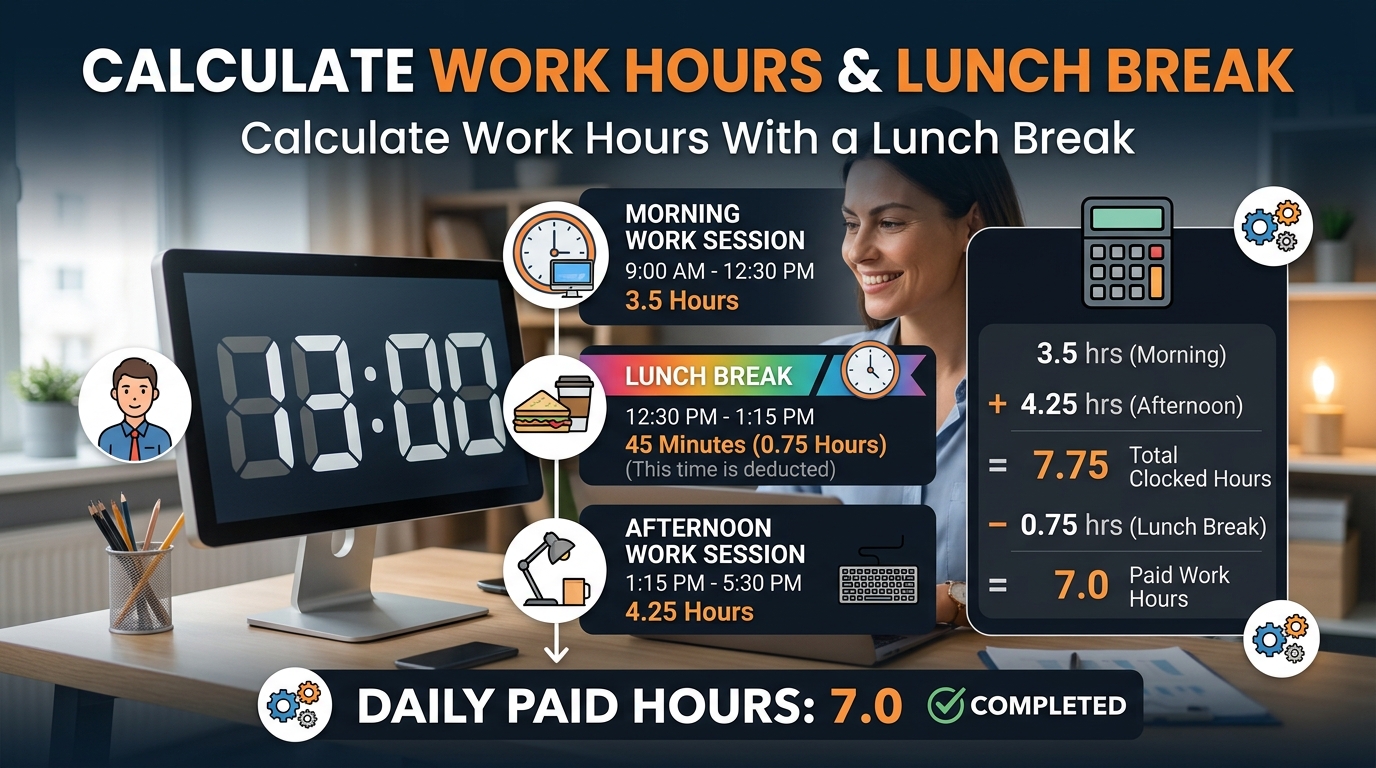
Lunch breaks can make a significant difference when calculating your daily working hours. The important detail is whether the break is paid or unpaid.
Example: 9:00 AM to 5:30 PM With an Unpaid Lunch
Suppose your schedule is:
The total time between clock-in and clock-out is 8 hours and 30 minutes. Subtract the unpaid lunch break:
If the break is paid, it generally remains included in paid time. Follow the applicable workplace policy and employment rules when preparing official records.
Quick Break Deduction Examples
| Total Shift Duration | Unpaid Break | Net Working Time |
|---|---|---|
| 8 hours | 30 minutes | 7 hours 30 minutes |
| 8 hours 30 minutes | 30 minutes | 8 hours |
| 9 hours | 45 minutes | 8 hours 15 minutes |
| 9 hours 30 minutes | 1 hour | 8 hours 30 minutes |
| 10 hours | 60 minutes | 9 hours |
These examples assume the listed break is unpaid and occurs within the shift.
Need to turn break minutes into hours?
Use the Minutes to Hours Calculator to convert minutes into hours.
Calculate an Overnight Shift
If you work a night shift, your clock-out time may be earlier on the clock than your clock-in time. This happens when your shift continues past midnight.
Example: 10:00 PM to 6:00 AM
You clock in at 10:00 PM and clock out at 6:00 AM the next day. Calculate the duration in two parts:
If you take a 30-minute unpaid break, the net working time is 7 hours and 30 minutes.
This method is helpful for night-shift employees, security staff, healthcare workers, hospitality teams, transport workers, and customer-support staff.
When entering times manually, make sure the clock-out time belongs to the following day. For shifts spanning multiple dates, use the actual dates where possible.
Need more detailed duration calculations?
Use the Time Duration Calculator to find the duration between two times or dates.
Convert Clock Hours Into Decimal Hours
Some timesheets, payroll systems, and invoicing tools require decimal hours instead of hours and minutes.
To convert a time duration into decimal hours, divide the minutes by 60 and add the result to the whole hours.
Example: 7 Hours 45 Minutes
If you worked 7 hours and 45 minutes:
Your timesheet entry would be 7.75 decimal hours, rather than 7.45.
Decimal Hours Conversion Chart
| Hours and Minutes | Decimal Hours |
|---|---|
| 15 minutes | 0.25 |
| 30 minutes | 0.50 |
| 45 minutes | 0.75 |
| 1 hour 15 minutes | 1.25 |
| 2 hours 20 minutes | 2.33 |
| 3 hours 30 minutes | 3.50 |
| 4 hours 45 minutes | 4.75 |
| 6 hours 15 minutes | 6.25 |
| 7 hours 30 minutes | 7.50 |
| 8 hours 45 minutes | 8.75 |
Decimal-hour conversion is especially useful when entering work hours into spreadsheets, payroll software, invoices, and project-tracking systems.
Keep the original minute values during intermediate calculations and round the final result according to the relevant reporting requirements.
Convert your shift duration into decimal hours.
Use the Time to Decimal Calculator to get the decimal format your timesheet may require.
Calculate Daily and Weekly Timesheet Hours
If you work different shifts throughout the week, calculate each day’s net working time and then add the results together.
Consider this example:
| Day | Clock In | Clock Out | Unpaid Break | Hours Worked |
|---|---|---|---|---|
| Monday | 9:00 AM | 5:30 PM | 30 minutes | 8 hours |
| Tuesday | 8:30 AM | 5:00 PM | 30 minutes | 8 hours |
| Wednesday | 9:00 AM | 5:00 PM | 30 minutes | 7 hours 30 minutes |
| Thursday | 8:00 AM | 4:30 PM | 30 minutes | 8 hours |
| Friday | 9:00 AM | 4:00 PM | 30 minutes | 6 hours 30 minutes |
| Weekly total | 38 hours | |||
Your total for the week is 38 hours.
For a reliable timesheet, record the actual clock-in and clock-out times, deduct only the appropriate unpaid breaks, and add the daily results.
This approach is useful for employees checking attendance records, managers reviewing schedules, and freelancers calculating time spent on client projects.
Calculate Split Shifts and Multiple Work Sessions
Some employees clock in and out more than once during a day. This may happen when a worker takes a long break between shifts or works separate morning and evening sessions.
Example: Morning and Evening Shifts
The two-hour gap between noon and 2:00 PM is not included because the worker was not on either shift during that period.
For split shifts, calculate each separate working interval and add the results. If a break is already excluded by separating the clock-in and clock-out periods, do not deduct it a second time.
This method is useful for restaurant employees, retail staff, delivery workers, part-time employees, and anyone with an irregular schedule.
Adding several work sessions together?
Use the Add Time Calculator to total hours and minutes from multiple intervals.
Calculate Your Work Hours and Estimated Earnings
If you are paid by the hour, your total working time can help you estimate gross earnings before taxes and other deductions.
Example: 38 Hours at $15 Per Hour
Suppose you work 38 hours in a week and earn $15 per hour.
This is a simple estimate based on the stated hourly rate. It does not account for overtime, bonuses, taxes, deductions, or other payroll adjustments.
For a shift lasting 7 hours and 45 minutes, first convert the duration to decimal hours:
Then multiply 7.75 by the hourly rate to estimate the gross amount for that shift.
Working with a duration given in seconds?
Use the Seconds to Time Converter to turn seconds into a time format before estimating earnings.
Common Time Clock Calculation Mistakes
Avoid these common errors when calculating work hours:
1. Forgetting Unpaid Breaks
A shift lasting 8 hours and 30 minutes with a 30-minute unpaid break contains 8 hours of working time.
2. Subtracting Paid Breaks Incorrectly
Paid breaks generally remain included in paid time, subject to applicable policies and rules.
3. Ignoring Midnight
A shift from 10:00 PM to 6:00 AM the following day lasts 8 hours.
4. Using Decimal Notation Incorrectly
Seven hours and 30 minutes equals 7.5 decimal hours, not 7.30.
5. Double-Counting Breaks
If separate clock-in and clock-out intervals already exclude a break, do not subtract it again.
6. Adding Rounded Values Too Early
Preserve the original minutes and round at the appropriate stage.
7. Confusing Hours Worked With Overtime
A total-hours calculation does not automatically determine overtime eligibility or the amount owed. Apply the relevant rules separately.
Checking these details can help you identify errors before submitting a timesheet or reviewing payroll records.
Frequently Asked Questions About a Work Hours Calculator
How do I calculate hours worked from clock-in and clock-out times?
Subtract the clock-in time from the clock-out time, then deduct any unpaid breaks. For example, 9:00 AM to 5:30 PM is 8 hours and 30 minutes. After a 30-minute unpaid break, the total is 8 hours.
How do I calculate my time card hours?
Record your starting and finishing times for each shift, calculate the elapsed duration, and subtract any applicable unpaid breaks. Add the net hours for all shifts included in the time card.
How do I calculate 8 hours with a 30-minute lunch break?
If your total shift span is exactly 8 hours and your lunch break is unpaid, subtract 30 minutes. Your net working time is 7 hours and 30 minutes.
What is 7 hours and 45 minutes in decimal hours?
Seven hours and 45 minutes equals 7.75 decimal hours because 45 divided by 60 equals 0.75.
How do I calculate hours from 9 AM to 5 PM?
The elapsed time from 9:00 AM to 5:00 PM is 8 hours. If you take a 30-minute unpaid lunch break, your net working time is 7 hours and 30 minutes.
Can a Work Hours Calculator handle overnight shifts?
A calculator that supports overnight shifts can calculate the duration from an evening clock-in to a morning clock-out on the following day. For example, 10:00 PM to 6:00 AM is 8 hours before break deductions.
Do I subtract lunch from my timesheet?
Subtract lunch only when the break is unpaid and should be excluded from the hours being calculated. Paid breaks and other workplace-specific arrangements may be treated differently.
How do I calculate weekly work hours?
Calculate the net working time for each shift and add the daily totals. For example, five shifts of 8 hours each equal 40 hours for the week.
What is the difference between a work hours calculator and a timesheet calculator?
A work hours calculator commonly focuses on the duration between clock-in and clock-out times. A timesheet calculator may also combine multiple shifts or days into daily, weekly, or pay-period totals. Features vary by tool.
Can I use calculated work hours to check my paycheck?
Yes. Calculated hours can help you compare your records with a payslip, but the final amount may depend on overtime, approved rounding, paid breaks, taxes, deductions, and applicable employment rules.
Calculate Your Work Hours More Easily With Calculator Online Pro
Manually checking clock-in and clock-out times can become frustrating when you have several shifts, unpaid breaks, or overnight work to account for.
A consistent calculation method helps you prepare timesheets, check daily working hours, track freelance projects, and organize your work schedule.
Time Calculator
Spend less time calculating your shifts manually and more time focusing on your work.