
Calculate time duration by finding the difference between a start time and an end time. Treat the end time as the next day when the interval crosses midnight, and deduct unpaid breaks separately for work hours.
Need to find how many hours and minutes pass between two times? Use a Time interval Calculator to calculate elapsed time, measure the length of an activity, and work out durations that cross midnight without manually counting every minute.
Whether you are calculating work hours, checking a meeting’s length, planning a journey, tracking study sessions, or measuring the time between a start and finish, an online duration calculator helps you get the answer quickly and accurately.
Calculate Time Duration Between Two Times
To calculate the duration between a start time and an end time, enter both times and find the difference. The result tells you how much time has elapsed in hours and minutes.
For example:
Instead of counting forward on a clock or subtracting minutes manually, enter the start and end times into the calculator to find the elapsed time.
How to Calculate Time Duration
Follow these steps to calculate the time between two clock readings:
Example: 10:15 AM to 1:45 PM
If a task starts at 10:15 AM and ends at 1:45 PM, the total duration is:
If you regularly calculate several time intervals, using an online calculator can reduce arithmetic mistakes and make your schedule easier to manage.
Want a fuller walkthrough of time calculations?
Time Interval Calculator Examples
Use these examples to check common time differences and understand how elapsed time is calculated.
| Start Time | End Time | Total Duration |
|---|---|---|
| 7:00 AM | 9:00 AM | 2 hours |
| 8:30 AM | 12:00 PM | 3 hours 30 minutes |
| 9:15 AM | 5:00 PM | 7 hours 45 minutes |
| 10:45 AM | 2:15 PM | 3 hours 30 minutes |
| 1:30 PM | 6:00 PM | 4 hours 30 minutes |
| 6:20 PM | 10:50 PM | 4 hours 30 minutes |
| 10:00 PM | 6:00 AM next day | 8 hours |
| 11:30 PM | 2:15 AM next day | 2 hours 45 minutes |
These examples cover ordinary daytime intervals and overnight durations. For any other start and end times, use the calculator rather than estimating the result.
Calculate Time Between Two Times Overnight
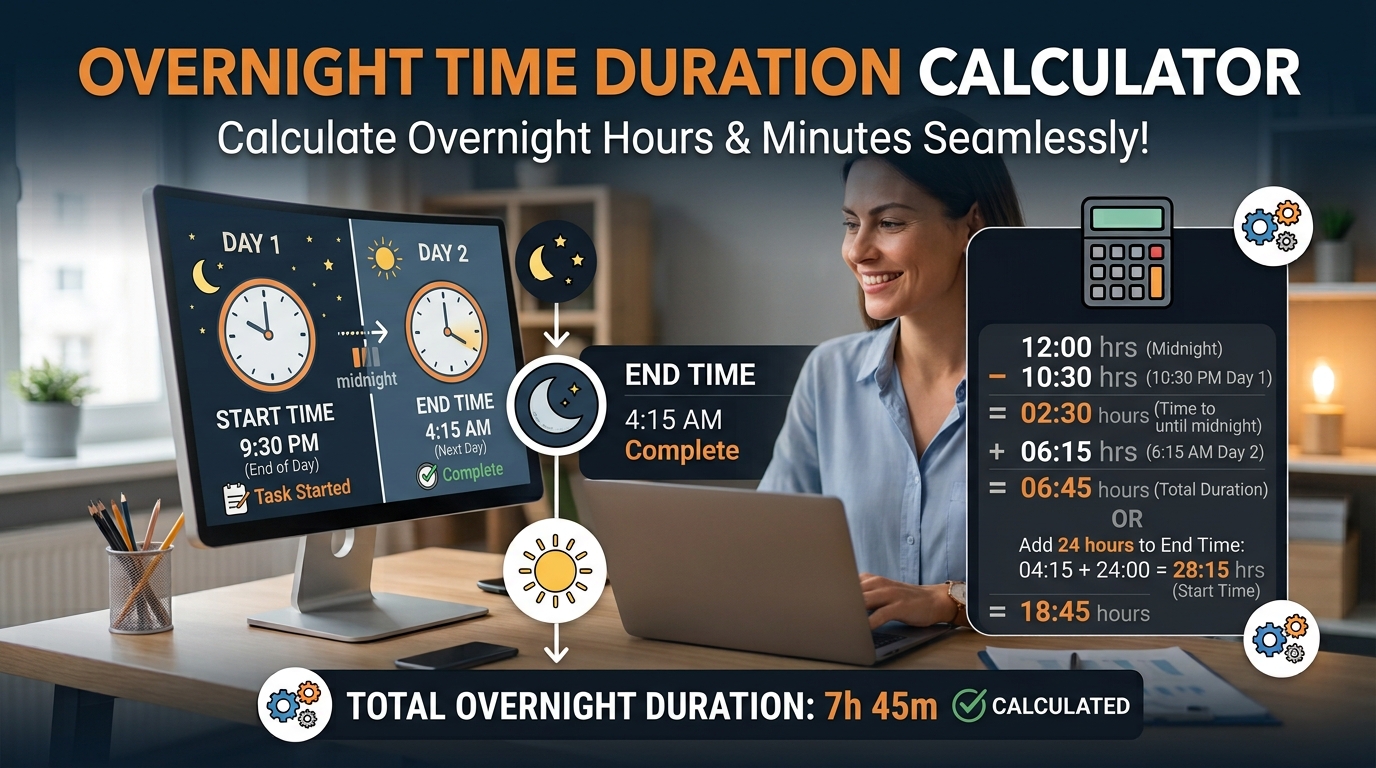
When a shift, journey, or activity starts before midnight and ends the following morning, ordinary subtraction can produce a confusing result. The important step is to recognize that the end time belongs to the next calendar day.
Example: 10:00 PM to 6:00 AM
Suppose your shift begins at 10:00 PM and finishes at 6:00 AM the next day.
Example: 11:30 PM to 2:15 AM
This calculation is useful for night shifts, hospital schedules, security work, transport services, overnight travel, and any activity that continues past midnight.
If you are tracking paid work, remember that elapsed time and paid time may differ because of unpaid meal breaks or other deductions.
Calculate Work Hours and Shift Duration
Finding the length of a work shift is one of the most common reasons to calculate time duration. You may need the result for a timesheet, attendance record, weekly work summary, or payroll preparation.
Example: 8:00 AM to 4:30 PM
Consider an employee who clocks in at 8:00 AM and clocks out at 4:30 PM.
For another example, a shift from 9:00 AM to 5:30 PM lasts 8 hours 30 minutes. After a 30-minute unpaid break, the net work time is 8 hours.
Need dedicated clock-in, clock-out, and break calculations?
Use the Time Clock Calculator to work out your daily work hours.
Convert Hours and Minutes to Decimal Hours
Some timesheets and payroll systems require decimal hours instead of hours and minutes. To convert the minutes into a decimal, divide the number of minutes by 60 and add the result to the whole hours.
Formula:
Examples:
Do not treat 7 hours 45 minutes as 7.45 decimal hours. The minutes must be converted into a fraction of an hour.
Convert your duration into decimal hours.
Use the Time to Decimal Calculator to get the decimal format your timesheet may require.
Calculate the Duration of Meetings, Classes, and Activities
A duration calculator is also helpful when you need to plan a day, estimate how long a task will take, or review how much time you spent on an activity.
Examples include:
These calculations can help you organize your calendar, compare planned and actual durations, and avoid underestimating how long an activity takes.
Add or Subtract Time From a Duration
Sometimes you already know the duration and need to add or remove hours and minutes. For example, you may want to find a finishing time, calculate the remaining time for a task, or adjust a schedule after a delay.
Add Hours and Minutes
Suppose an activity starts at 2:20 PM and lasts 3 hours 45 minutes.
The activity finishes at 6:05 PM.
Subtract Hours and Minutes
Suppose you have 5 hours 30 minutes available and use 2 hours 45 minutes.
For subtracting one duration from another, keep hours and minutes in the correct units and borrow one hour as 60 minutes when necessary.
Need the resulting clock time from a start time and a duration?
Use the Add Time Calculator to add hours and minutes to a start time.
Calculate Time Duration in Minutes or Seconds
Some activities are too short to measure conveniently in hours. You may need the duration in minutes or seconds for exercise, cooking, testing, video editing, or short tasks.
Useful conversions include:
Need to turn minutes into hours?
Use the Minutes to Hours Calculator to convert minutes into hours.
Example: Video Clip Duration
If a video begins at 1 minute 20 seconds and ends at 4 minutes 05 seconds, the elapsed duration is:
When working with hours, minutes, and seconds together, convert values into a common unit if you need to compare or combine durations. Confirm that the calculator you use accepts the time format you have.
Have a duration in seconds?
Use the Seconds to Time Converter to convert seconds into a time format.
Time Duration vs. Time Difference
These phrases are closely related, but people may use them for slightly different purposes.
For example, 8:00 AM to 4:30 PM represents 8 hours 30 minutes of elapsed time. If the employee takes a 30-minute unpaid break, the working time is 8 hours.
For more complex schedules, such as multiple shifts or work periods, make sure each interval and any applicable break is accounted for separately.
Looking for a general-purpose time tool?
Use the Time Calculator for everyday time calculations.
Common Time Duration Calculation Mistakes
Small errors can affect a timesheet, schedule, or project estimate. Check these points before relying on a result:
1. Ignoring Midnight
A shift from 10:00 PM to 6:00 AM lasts 8 hours, not a negative duration.
2. Subtracting Minutes Incorrectly
From 2:15 to 4:00 is 1 hour 45 minutes, not 1 hour 85 minutes.
3. Forgetting Unpaid Breaks
An 8-hour-30-minute shift with a 30-minute unpaid break includes 8 hours of net work time.
4. Confusing Decimal Hours With Minutes
6 hours 30 minutes equals 6.5 decimal hours, not 6.30.
5. Mixing AM and PM
Confirm whether the start and end times are in the morning or afternoon.
6. Using the Wrong Date
For intervals spanning one or more days, include the correct dates rather than assuming the interval ends the same day.
7. Overlooking Time Zones
For travel or remote meetings across time zones, account for the applicable time zone and daylight-saving changes.
A calculator can handle the arithmetic, but correct inputs and clear assumptions are still essential.
Frequently Asked Questions
How do I calculate time duration between two times?
Enter the start time and end time, then calculate the difference. For example, 9:00 AM to 1:30 PM is 4 hours 30 minutes. If the interval crosses midnight, treat the ending time as occurring on the next day.
How do I calculate hours and minutes between two times?
Find the total elapsed minutes between the two readings, then convert each 60 minutes into one hour. For example, 10:15 AM to 12:50 PM is 2 hours 35 minutes.
Can I calculate a duration that crosses midnight?
Yes. A time interval can continue into the next day. For example, 11:00 PM to 7:00 AM the next day is 8 hours.
How do I calculate work hours after a lunch break?
First calculate the elapsed time from clock-in to clock-out. Then subtract any unpaid breaks. For example, 8:00 AM to 5:00 PM is 9 hours elapsed; subtracting a one-hour unpaid lunch gives 8 working hours.
How do I convert a time duration into decimal hours?
Divide the minutes by 60 and add that fraction to the whole hours. For example, 4 hours 30 minutes equals 4.5 decimal hours, while 4 hours 15 minutes equals 4.25 hours.
What is the difference between elapsed time and working time?
Elapsed time is the full interval between the start and finish. Working time is the portion counted as work after applicable unpaid breaks or other exclusions are deducted.
Can I calculate time duration in minutes?
Yes, provided your calculation method or tool supports the required format. One hour contains 60 minutes, so 2 hours 20 minutes equals 140 minutes.
Which calculator should I use for time duration?
Use the Time Interval Calculator to find the length of an interval between two times. For adding a duration to a clock time, use an add time calculator. For clock-in, clock-out, and break calculations, use a dedicated time clock tool if available.
Calculate Your Next Time Interval More Easily
Whether you need to measure a work shift, check the length of a meeting, plan a journey, or calculate the hours between two clock readings, accurate duration calculations make everyday planning simpler.
Use the Time Interval Calculator on Calculator Online Pro to work out elapsed time without manually counting hours and minutes.
Time Interval Calculator
Work out elapsed time between two times without manually counting hours and minutes.