
Converting standard AM/PM times into military-time helps you read employee schedules, check shift assignments, organize appointments, and complete timesheets with fewer time-entry mistakes. The key is knowing how to convert morning and afternoon times, recognize midnight and noon, and record overnight shifts correctly.
Quick Military-Time Conversion
7:30 AM = 0730, 2:00 PM = 1400, and 9:45 PM = 2145.
For AM times, keep the hour unchanged and add a leading zero when needed. For PM times after noon, add 12 to the hour. Noon is 1200, and midnight is 0000.
Military-time follows a continuous 24-hour sequence. Instead of repeating the same hour numbers with AM and PM, each time has its own four-digit notation. This makes it easier to distinguish morning, afternoon, evening, and overnight schedules when staff members work different shifts.
Need to convert a clock time while preparing a schedule or checking a shift assignment?
Use the Military-Time Converter →Convert Military-Time for Work Schedules
If your workplace uses a 24-hour schedule, you can convert standard clock times by following a few simple rules. The minutes stay the same; you only need to handle the hour correctly.
- AM times: Keep the hour the same, adding a leading zero when needed. For example, 6:30 AM becomes 0630.
- PM times: Add 12 to the hour for times after 12:00 PM. For example, 4:30 PM becomes 1630.
- Noon: 12:00 PM becomes 1200.
- Midnight: 12:00 AM becomes 0000.
The minutes remain unchanged during conversion. For example, 8:45 AM becomes 0845, while 8:45 PM becomes 2045.
Need to read or communicate 24-hour times clearly with colleagues? Learn how military-times are spoken in everyday situations.
Learn How to Say Military-Time Out Loud →Military-Time Conversion Chart for Work & Scheduling
Use this quick-reference chart to check common start times, finish times, staff shifts, and scheduled appointments. It can also help you confirm a time before entering it into a rota or timesheet.
| Standard-Time | Military-Time | Common Scheduling Use |
|---|---|---|
| 6:00 AM | 0600 | Early shift start |
| 7:00 AM | 0700 | Morning shift |
| 8:00 AM | 0800 | Office opening |
| 9:00 AM | 0900 | Standard work start |
| 12:00 PM | 1200 | Lunch or noon appointment |
| 1:00 PM | 1300 | Afternoon shift |
| 2:00 PM | 1400 | Afternoon appointment |
| 3:00 PM | 1500 | Mid-afternoon schedule |
| 4:00 PM | 1600 | Shift finish |
| 5:00 PM | 1700 | Office closing |
| 6:00 PM | 1800 | Evening shift |
| 8:00 PM | 2000 | Evening appointment |
| 10:00 PM | 2200 | Night shift |
| 11:00 PM | 2300 | Late-night work |
| 12:00 AM | 0000 | Midnight |
Remember that the minutes do not change when you convert a time. For example, 3:45 PM becomes 1545, not 1530. The hour changes according to the conversion rule, while the minutes remain exactly as recorded.
How to Use Military-Time in Employee Scheduling
Using military-time for employee schedules can help managers, supervisors, and workers communicate start and finish times clearly. It is particularly useful when several shifts operate throughout the day and night.
When preparing a staff rota, write the start and finish times in the same format. The examples below show how ordinary work schedules can be recorded using four-digit time notation.
0800–1600
This shift starts at 8:00 AM and finishes at 4:00 PM. It represents 8 hours before breaks.
1300–2100
This shift begins at 1:00 PM and ends at 9:00 PM, giving 8 hours before breaks.
2200–0600
This shift begins at 10:00 PM and finishes at 6:00 AM the next day. Its elapsed duration is 8 hours before breaks.
For shifts that cross midnight, make the next-day finish explicit so employees know which date applies. A schedule showing 2200–0600 should clearly indicate that the finish time falls on the following day.
Working with rotating schedules, morning shifts, or overnight duties? Use this related guide to make shift times easier to record and understand.
Read the Military-Time Guide for Shift Workers →How to Calculate Work Hours From Military-Time
Converting times is only the first step when you need to calculate employee hours. Once the start and end times are recorded, work out the elapsed duration and subtract unpaid breaks where applicable.
Example 1: Day Shift
An employee works from 0745 to 1645.
- Start time: 0745 (7:45 AM)
- End time: 1645 (4:45 PM)
- Total shift duration: 9 hours
- Unpaid break: 1 hour
- Net working time: 8 hours
Example 2: Overnight Shift
An employee works from 2000 to 0430 the next day. The elapsed duration is 8 hours 30 minutes. Deduct a 30-minute unpaid break to get 8 hours of net working time.
Calculate the actual elapsed time first. Then subtract any unpaid breaks rather than treating the four-digit military-time as a decimal number.
If you need to find the exact elapsed time between two entries before subtracting breaks, use the step-by-step examples in our guide on How to Calculate Time Difference in Military-Time.
Common Military-Time Conversion Mistakes at Work
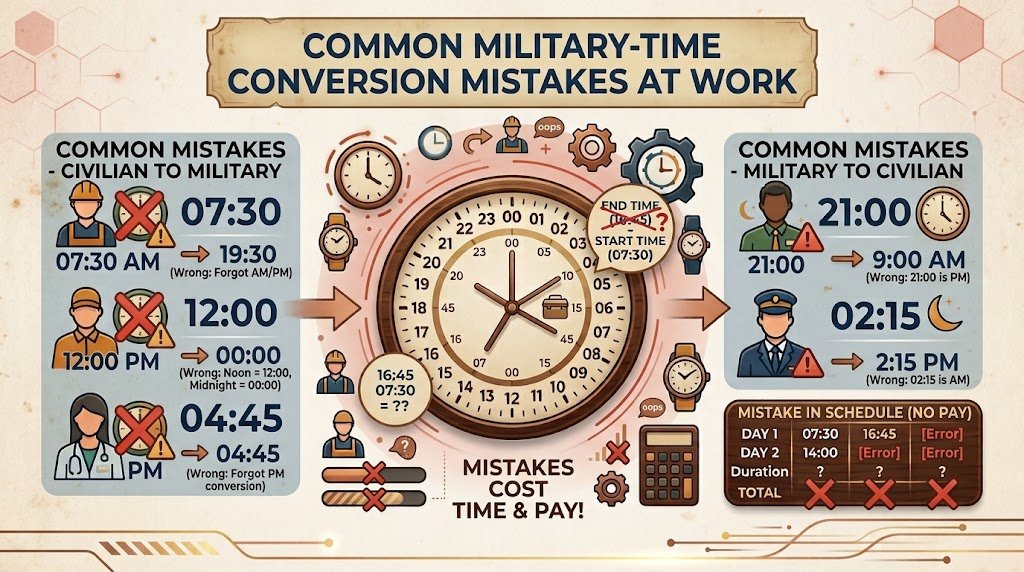
Small time-entry errors can affect shift planning, timesheets, and appointment records. Check the following details before sharing a schedule or submitting work hours.
- Mixing up noon and midnight: 1200 is noon, while 0000 is midnight at the start of a new day.
- Adding 12 to noon: 12:00 PM remains 1200; it does not become 2400.
- Forgetting the leading zero: Use 0700 rather than 700 when recording a time in four-digit notation.
- Changing the minutes: 3:45 PM converts to 1545, not 1530.
- Misreading overnight shifts: A shift from 2300 to 0700 finishes the next day.
- Confusing clock time with decimal hours: 1730 means 5:30 PM, not 17.30 decimal hours.
Consistent formatting helps prevent confusion when writing clock-in times, clock-out times, and shift entries.
Learn How to Write Military-Time Correctly →Frequently Asked Questions
How do you convert military-time for work schedules?
Keep AM hours unchanged, adding a leading zero when necessary. For PM times after noon, add 12 to the hour. For example, 7:00 AM becomes 0700, and 7:00 PM becomes 1900. Noon remains 1200, while midnight is 0000.
What is 0800 in regular time?
0800 means 8:00 AM. It is commonly used for morning shifts, office opening times, and employee clock-in records.
What does 1700 mean on a work schedule?
1700 means 5:00 PM. If your schedule says 0900–1700, your shift runs from 9:00 AM to 5:00 PM, totaling 8 hours before breaks.
Why do workplaces use military-time?
The 24-hour format reduces confusion between AM and PM and helps distinguish daytime and overnight shifts. It is useful in healthcare, transport, security, manufacturing, and other workplaces that operate across multiple shifts.
How do you convert 12-hour time to 24-hour time?
For AM times, keep the hour unchanged except that midnight becomes 0000. For PM times, add 12 to the hour except at noon, which remains 1200. Keep the minutes unchanged throughout the conversion.
How can I convert military-time quickly?
Use the Calculator Online Pro Military-Time Converter to convert between standard AM/PM time and military-time without manually calculating each entry.
How do I record work hours in a timesheet?
Record the shift start and finish times consistently, calculate the elapsed duration, and subtract unpaid breaks when applicable. If a shift crosses midnight, account for the next-day finish before calculating the total.
Need to review clock-in and clock-out entries or work out the total hours for a shift? Explore the related timesheet guide for practical examples.
Read Military-Time for Timesheets – Calculate Work Hours →Once your times are converted, learn how to work out the length of a shift, account for unpaid breaks, and handle a shift that crosses midnight.
Read How to Calculate Shift Duration Using Military-Time →For night shifts, the finishing time often belongs to the following calendar day. Review the correct approach to calculating overnight work periods.
Learn How to Calculate Overnight Shifts in Military-Time →Convert Work & Scheduling Times With Calculator Online Pro
Whether you are organizing employee shifts, checking appointment times, preparing a weekly rota, or reviewing a timesheet, accurate military-time conversion makes everyday scheduling easier. A consistent 24-hour format helps everyone understand when a shift starts and ends.
Instead of repeatedly checking conversion rules, use the Calculator Online Pro tool to convert standard time to military-time and military-time back to AM/PM format.
Military-Time Converter
Convert clock times for work schedules, employee shifts, appointments, and daily planning. Check time entries quickly and make your schedules easier to read.
Convert Military-Time Now →Back to the top ↑
Make work schedules clearer by using consistent time notation and checking shift start and finish times before sharing or submitting them.