
Use this guide to calculate driving time, compare different average speeds, estimate arrival times, and plan a trip with fewer scheduling surprises.
Need to know how long a drive will take before you leave? Use a driving time estimator to estimate your journey from distance and average speed, work out driving hours and minutes, and plan when you should arrive. Whether you are commuting to work, travelling between cities, or preparing for a long road trip, a quick calculation can help you build a more realistic schedule.
For a practical estimate, start with the total driving distance and your expected average speed. Then add time for fuel stops, meals, traffic delays, roadworks, and other breaks. This gives you a better picture of your total journey time than driving distance alone.
How to Calculate Driving Time From Distance and Speed
The simplest way to calculate driving time is to divide the distance you need to travel by your average speed.
Your distance and speed must use compatible units. For example, use miles with miles per hour (mph), or kilometers with kilometers per hour (km/h).
Here is how the calculation works:
| Driving Distance | Average Speed | Estimated Driving Time |
|---|---|---|
| 60 miles | 60 mph | 1 hour |
| 120 miles | 60 mph | 2 hours |
| 150 miles | 50 mph | 3 hours |
| 200 km | 100 km/h | 2 hours |
| 300 km | 75 km/h | 4 hours |
These examples show driving time without additional stops or delays. Your actual journey may take longer because of traffic, road conditions, speed restrictions, or changes in your route.
Need to work out a different time calculation?
How Long Will My Drive Take?
Your journey time depends on both the distance and the average speed you can maintain throughout the trip. A longer route with faster roads can sometimes take less time than a shorter route through congested streets.
Use these examples to estimate how long a drive might take under steady-speed conditions.
| Distance | At 40 mph | At 50 mph | At 60 mph |
|---|---|---|---|
| 30 miles | 45 minutes | 36 minutes | 30 minutes |
| 60 miles | 1 hr 30 min | 1 hr 12 min | 1 hour |
| 100 miles | 2 hr 30 min | 2 hours | 1 hr 40 min |
| 150 miles | 3 hr 45 min | 3 hours | 2 hr 30 min |
| 200 miles | 5 hours | 4 hours | 3 hr 20 min |
| 300 miles | 7 hr 30 min | 6 hours | 5 hours |
These are mathematical estimates, not live route predictions. Actual driving speeds vary by road type, traffic, weather, and local restrictions.
Example: 100 Miles at 50 mph
A 100-mile journey at an average speed of 50 mph takes two hours of driving. If you expect a 20-minute traffic delay and take a 15-minute break, your total trip duration becomes approximately 2 hours and 35 minutes.
This is the number to use when planning an appointment, pickup, delivery, or road trip.
Want to measure the time that has passed between two points?
How to Estimate Total Trip Time With Stops
A realistic road trip estimate should account for more than time spent moving. Even a straightforward drive may include a fuel stop, a meal break, a restroom visit, or a delay near a busy town.
Use this formula:
Example: 240 Miles at 60 mph
Suppose you are travelling 240 miles at an average speed of 60 mph.
If you leave at 8:00 AM, your estimated arrival time is 12:55 PM, assuming the inputs remain accurate.
For longer journeys, consider adding a reasonable buffer rather than planning to arrive at the exact calculated minute. This is especially useful when you have a fixed check-in time, an important meeting, or a flight to catch.
How to Calculate Your Estimated Arrival Time
Once you know your total journey duration, you can estimate when you will reach your destination.
For example:
| Detail | Time |
|---|---|
| Departure | 9:15 AM |
| Estimated driving time | 3 hours 20 minutes |
| Planned break | 20 minutes |
| Total journey time | 3 hours 40 minutes |
| Estimated arrival | 12:55 PM |
If your journey crosses noon or midnight, remember to account for the change in AM/PM or the calendar date.
Example: Leaving at 10:30 PM
Leaving at 10:30 PM for a journey lasting 3 hours means you should arrive at approximately 1:30 AM the following day, assuming no additional delays.
Time Duration Calculator
Calculate the difference between two times or determine how long a journey lasts.
Travel Time vs. Distance: Why a Shorter Route Is Not Always Faster
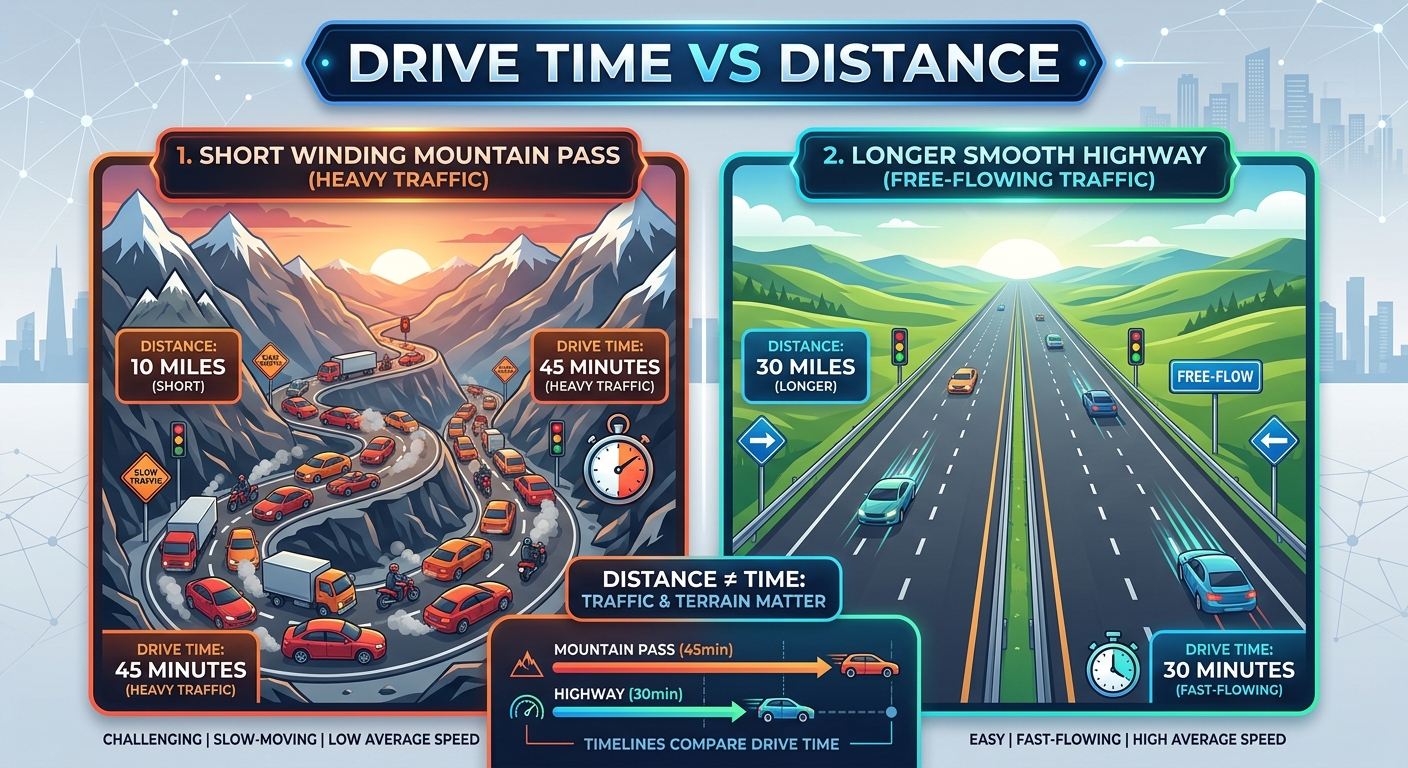
When comparing two driving routes, do not choose based on distance alone. A route that covers fewer miles or kilometers may include slower roads, more intersections, heavy traffic, or frequent stops.
Consider these hypothetical route estimates:
| Route | Distance | Average Speed | Driving Time |
|---|---|---|---|
| Route A | 90 miles | 45 mph | 2 hours |
| Route B | 105 miles | 70 mph | 1 hour 30 minutes |
Route B is 15 miles longer but takes 30 minutes less under these assumed average speeds.
This illustrates why it is useful to compare estimated travel time alongside road distance. For an actual journey, check a navigation service such as Google Maps for route options and available traffic information.
Planning a trip and comparing journey times?
How Traffic Affects Driving Time
Traffic can significantly change your estimated arrival time, particularly during rush hour, holiday travel, road construction, or busy urban journeys.
A basic driving time calculator uses distance and average speed. It does not automatically know whether a particular road is congested unless it is connected to current route and traffic data.
To make your estimate more practical:
For live route estimates, enter your starting point and destination in a navigation service. Available routes can show estimated travel times, and traffic-aware estimates depend on the selected journey and available data.
Driving Time Calculator in Miles and Kilometers
You can estimate driving time using either miles or kilometers. The important point is to match the distance unit to the speed unit.
| Distance Unit | Speed Unit | Example | Result |
|---|---|---|---|
| Miles | Miles per hour (mph) | 120 miles ÷ 60 mph | 2 hours |
| Kilometers | Kilometers per hour (km/h) | 180 km ÷ 90 km/h | 2 hours |
If you have a distance in kilometers but a speed in mph, convert one of the values before calculating.
Example: 160 Kilometers at 50 mph
160 kilometers is approximately 99.4 miles. At 50 mph, that distance would take about 1 hour and 59 minutes under steady-speed conditions.
How to Calculate Driving Time for a Long Road Trip
Long-distance travel requires more planning because small delays can add up over several hours.
Before setting off, consider these factors:
Example: 360 Miles at 60 mph
A 360-mile trip at an average speed of 60 mph requires six hours of driving. Adding 45 minutes for breaks and an estimated 30-minute delay gives a total of 7 hours and 15 minutes.
A 7:00 AM departure would therefore produce an estimated arrival around 2:15 PM.
Treat this as a planning estimate, not a guarantee. If you are travelling a long distance, schedule appropriate rest periods and never sacrifice safe driving to meet an estimated arrival time.
Want a fuller walkthrough of calculating time between two points?
Driving Time Estimator vs. Google Maps
Both tools can help with trip planning, but they serve different purposes.
| Feature | Basic Travel Time Calculation | Google Maps Route Estimate |
|---|---|---|
| Calculates time from distance and speed | Yes | Uses route and speed-related information |
| Requires a known distance | Usually | No; you can enter locations |
| Provides a route between locations | No | Yes |
| Can show alternative routes | No | Where available |
| Can account for current traffic | Not unless specifically supported | Where traffic data is available |
| Useful for learning the driving-time formula | Yes | Less focused on the formula |
Choose a distance-and-speed calculation when you already know the route length and want to estimate duration quickly. Use a navigation service when you need directions between specific places or want to compare available routes.
Example: 150 Miles at 50 mph
If you already know that your journey is 150 miles and expect to average 50 mph, the calculation is straightforward: three hours of driving. If you need to know which road to take and whether congestion may affect your arrival, check a live navigation service.
Common Driving Time Calculation Mistakes
A useful estimate depends on realistic inputs. Avoid these common mistakes when planning a trip.
1. Using the Speed Limit as Your Average Speed
The maximum permitted speed is not necessarily the speed you will maintain across the entire journey. Junctions, traffic, and slower roads affect your average.
2. Ignoring Rest Stops
A four-hour driving estimate does not include a meal, fuel stop, or other break unless you add that time separately.
3. Mixing Miles and Kilometers
Dividing kilometers by miles per hour produces an incorrect result. Convert the distance or use a matching speed unit first.
4. Assuming the Calculated Arrival Time Is Guaranteed
A formula cannot predict every traffic jam, road closure, weather event, or unexpected stop. Keep your schedule flexible.
5. Confusing Driving Time With Total Trip Time
Driving time measures the time spent travelling. Total trip time can include stops, delays, and other planned interruptions. Make sure you use the figure that matches your purpose.
Need to subtract a lunch break from your hours?
Looking for a quick way to total your hours?
Need clock-in and clock-out calculations?
Frequently Asked Questions About Driving Time
How do I calculate driving time from distance?
Divide the distance by your average speed. For example, 180 miles at an average speed of 60 mph takes three hours of driving, before stops or delays.
How long does it take to drive 100 miles?
At an average speed of 50 mph, driving 100 miles takes two hours. At 60 mph, it takes approximately 1 hour and 40 minutes. Actual journey times depend on road and traffic conditions.
How long does it take to drive 200 miles?
At 50 mph, 200 miles takes four hours. At 60 mph, it takes approximately 3 hours and 20 minutes. Add extra time for breaks and traffic when planning your departure.
How do I calculate driving time in kilometers?
Divide the distance in kilometers by your average speed in kilometers per hour. For example, 240 km at 80 km/h takes three hours of driving.
Can I calculate driving time without knowing my average speed?
You need an assumed average speed to calculate time from distance alone. If you do not know it, use a reasonable estimate for your road type, or check a navigation service for a route-specific travel-time estimate.
Does a travel time estimator include traffic?
A basic calculation using distance and speed does not automatically include live traffic. You must account for expected delays separately unless your tool specifically supports traffic adjustments.
How do I calculate arrival time after a long drive?
Add your total estimated journey duration to your departure time. Include planned breaks and anticipated delays first. If the calculation passes midnight, your arrival will be on the following day.
Is driving time the same as travel time?
Not always. Driving time generally refers to time spent driving, while total travel time can include stops and delays. Check which figure you are using when planning appointments or road trips.
Can I use a travel time Estimator for daily commuting?
Yes. Estimate your commute using the route distance and a realistic average speed. For a more useful schedule, account for recurring congestion, parking, and the time needed to reach your workplace after parking.
How accurate is a driving time estimate?
A distance-and-speed estimate is mathematically reliable when its inputs are correct, but the result may differ from your actual journey. Route conditions, traffic, weather, stops, and changes in average speed all affect the final duration.
Plan Your Next Journey With Confidence
A reliable driving-time estimate helps you decide when to leave, when to schedule a break, and how much time to allow before an appointment. Start with your distance and realistic average speed, then include the delays and stops that are likely to affect your journey.
If you need to calculate a time difference, add or subtract hours and minutes, or work out a journey duration, explore the tools available on Calculator Online Pro.
Need to add hours and minutes to a starting time?
Looking for more calculators?
Choose the tool that fits your calculation, check your route before departure, and allow enough time to travel safely.
Time Calculator
Add, subtract, and calculate time more conveniently.